
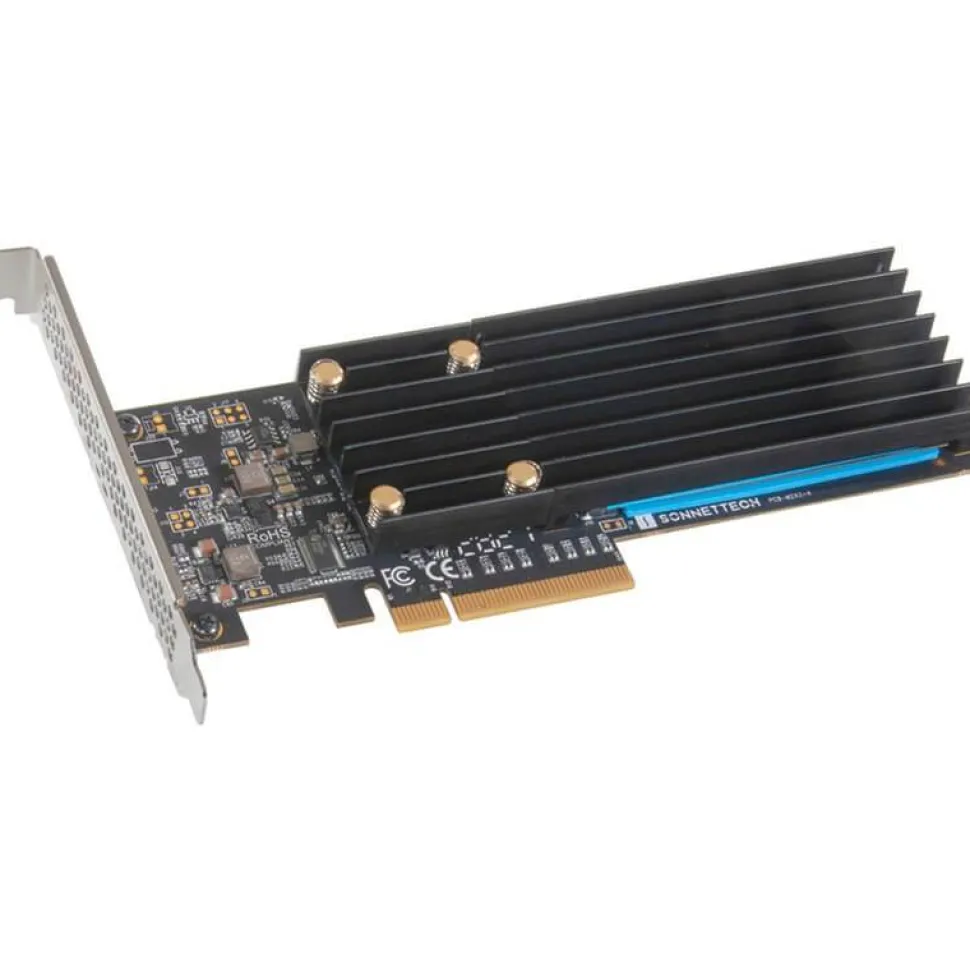
Sonnet M.2 2×4 Low-profile PCIe Card Silent
$153.00
M.2 2×4 Low-profile PCIe Card
If you need to add internal storage to your computer and ultra-high-speed data transfers are critical to your work, you need NVMe SSD storage. While a single M.2 NVMe PCIe SSD offers tremendous performance — 10x more than that of a spinning drive — Sonnet’s M.2 2×4 Low-profile PCIe Card enables you to mount two of them into a single x8 card slot and combine their performance. No matter how you use it, this card can transform the way you work or play.
- Two M.2 NVMe Slots
- Add up to 16TB of storage with your own high performance M.2 NVMe SSDs
- Super High-speed Data Transfers
- NVMe SSDs offer 10x (or more) performance of spinning drives
- Low Profile – Fits Anywhere
- Install in a computer or Thunderbolt expansion system x8 PCIe slot
RAID 0 Performance
Install the M.2 2×4 Low-profile PCIe Card with your SSDs into your computer with PCIe 3.0 or 4.0 card slots, and then configure them as a RAID 0 set to obtain data transfers up to 6600 MB/s.
Install in an x8 PCIe Card Slot
Sonnet’s M.2 2×4 Low-profile PCIe Card fits in almost any card space with an available x8 PCIe card slot, whether in a desktop tower, mini workstation, or server computer; or even in a Sonnet Thunderbolt expansion system. Included full-height and low-profile brackets enable a secure fit wherever you install it.
Sonnet Advantages
Sonnet’s M.2 2×4 Low-profile PCIe Card uses an 8-lane (x8) interface designed to support full performance from two SSDs. The M.2 2×4 card features:
- 16 Lane PCIe Bridge
- With an 8 lane PCIe connection to the host, the high-performance PCIe 3.0 bridge chip devotes four lanes of PCIe bandwidth to each SSD to support maximum performance
- Self-contained
- The card’s SSD RAID configuration support doesn’t require a specific motherboard or SSDs to operate — no PCIe bifurcation required
- Universal Compatibility
- Compatible with Mac, Windows, and Linux computers with an x8 PCIe slot
- Broad M.2 NVMe SSD Support
- Works with a wide variety of M.2 2280 NVMe PCIe SSDs
macOS Boot Supporter. Applications’ Scratch Disk. Time Machine Backup.
Mac users can install macOS® on one SSD to create a fast boot volume, and then use the other installed SSD for file storage; as a super-fast plug-in, media storage, or scratch disk; or even for use as a Time Machine® backup volume.
No Slowdowns. No Thermal Throttling. Full Performance.
SSDs heat up significantly while performing very large file transfers and will protect themselves from overheating by “thermal throttling” — a feature that drastically cuts SSDs’ performance until they cool off to a safe level. The Sonnet M.2 2×4 Low-profile PCIe Card’s silent SSD cooling solution works to keep SSDs always cool enough to eliminate the need for thermal throttling and enables your SSDs to always maintain their highest potential performance.
Connect Two SSDs Through One Cable
Got a Thunderbolt connection, but no PCIe card slot? Sonnet’s M.2 2×4 Low-profile PCIe Card is ideal for use in any one of Sonnet’s Thunderbolt expansion systems. The combo enables you to add one or two SSDs to any Mac (M1, M2, M1 Pro, M1 Max, M1 Ultra, Intel®), Windows, or Linux computer with Thunderbolt ports.
Easy System Integration
Integrating a Sonnet M.2 2×4 Low-profile PCIe Card into your system is easy — NVMe compliance ensures the necessary drivers are installed automatically. The M.2 2×4 uses the operating systems’ built-in drive formatting utilities to format the SSDs. SSD health monitoring is supported through S.M.A.R.T. (Self-Monitoring, Analysis and Reporting Technology) data reporting, too.
More SSDs? More Connectivity?
Do you need to install more than two M.2 NVMe SSDs? Check out Sonnet’s M.2 4×4 PCIe Card with double the capacity and double the potential performance of the M.2 2×4 card. Or do you need more connectivity in addition to dual SSD support? Look at the McFiver™ PCIe Card; it offers the same performance of the M.2 2×4 card plus two 10Gbps USB-C® ports and a 10Gb Ethernet port.
- Two M.2 NVMe SSD Slots on a Low-profile x8 PCIe Card (Add Your Own M.2 SSDs)
- Add up to 16TB of Ultra-fast Storage
- Mounts one or two M.2 NVMe SSDs (sold separately) in an x8 PCIe slot
- Fits in Almost Any Card Space
- Low-profile card includes full-height (pre-attached) and low-profile PCIe brackets; fits in almost any computer or Thunderbolt expansion system with an available x8 PCIe slot
- High-performance PCIe Interface
- PCI Express 3.0 x8 host bus interface plus connects four lanes of PCIe 3.0 bandwidth to each installed SSD
- Superior Performance
- Achieve sustained single SSD speeds up to 3400 MB/s, RAID 0 speeds up to 6600 MB/s
- macOS Boot Support
- Supports booting from a single (non-RAIDed) attached SSD
- No Thermal Throttling
- Card design enables installed SSDs to maintain high performance during very large file transfer operations
- Optimized for Thunderbolt
- Use in Sonnet Thunderbolt expansion systems to connect two SSDs through one cable with performance up to 2800 MB/s
- NVMe Compliant
- No drivers required
- S.M.A.R.T. Operation
- Supports S.M.A.R.T. (Self-Monitoring, Analysis and Reporting Technology) data reporting
SSDs sold separately
Mac Compatibility
Mac Pro 7,1 (2019)
Mac Pro 5,1 (Mid 2010 & Mid 2012)
macOS 10.13.6+
macOS Monterey compatible
Windows Compatibility
Windows computer with available x8 PCIe slot (PCIe bifurcation not required)
Windows 11 and 10
Linux Compatibility
Linux computer with available x8 PCIe slot (PCIe bifurcation not required)
Linux Kernel 5.0+
IN THE BOX:
- Sonnet M.2 2×4 Low-profile PCIe card
- Two mounting brackets (full-height and low-profile)
- Thermal transfer pads
- Documentation
Be the first to review “Sonnet M.2 2×4 Low-profile PCIe Card Silent”
Related products
Accessories
Accessories


Accessories
Accessories
Accessories


Accessories
Accessories
Accessories


Accessories

Accessories
Accessories

Accessories
Accessories

Accessories

Accessories
Reviews
There are no reviews yet.